Setup Wizard
The Setup Wizard is the primary tool for initializing and configuring your curved screen system (ArcUI System) within Unity.
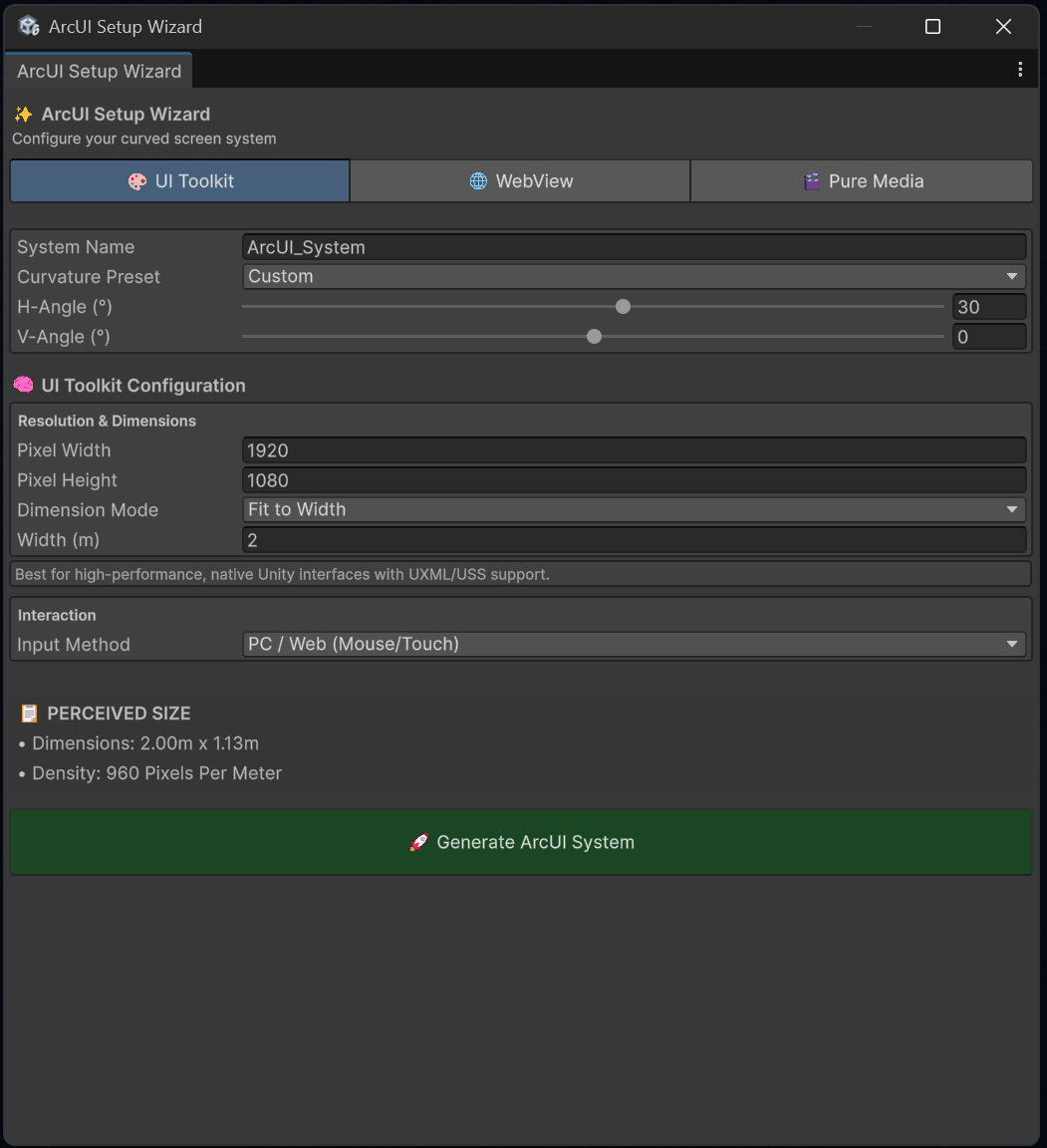
Render Modes (Tabs)
The wizard offers three main modes depending on the type of content you plan to display on your spatial interface. Each tab automatically configures the system with the optimal components for that specific use case:
🎨 UI Toolkit
This is the recommended option for building high-performance, native interfaces in Unity.
- Ideal Use Case: Complex interfaces built with Unity’s modern UI system using UXML and USS files.
- Configuration: Allows you to define the resolution (Pixel Width / Height), dimension mode (e.g., Fit to Width), and interaction method (Mouse, Touch, Raycast XR, etc.).
- Advantage: Being native to Unity, it offers the best performance and deep integration with the scene hierarchy and event system.
🌐 WebView
Allows you to render complete web applications (such as a React or Next.js dashboard) directly within the 3D space.
- Ideal Use Case: When you already have an IoT control panel or web dashboard and need to bring it immediately into Mixed or Virtual Reality without reprogramming.
- Advantage: Maximum flexibility and reuse of existing web code. It allows you to use your favorite web stack for UI logic.
🎬 Pure Media
Optimized exclusively for audiovisual content playback.
- Ideal Use Case: Displaying live security cameras, video streams, 360 videos, or static images on the curved surface.
- Advantage: Avoids the overhead of a UI engine (like UI Toolkit or an embedded web browser) and focuses on sending the video texture directly to the material, maximizing FPS.
System Configuration
Regardless of the render mode you choose, the wizard will ask you to define the physical shape of the screen in your 3D world:
- System Name: The name of the object to organize your hierarchy in Unity.
- Curvature Preset: Predefined curvature templates (e.g., Monitor, Cylindrical, Sphere) or “Custom”.
- H-Angle / V-Angle: Horizontal and vertical Field of View to define how much the screen will wrap around the user.
- Perceived Size: The wizard calculates the physical dimensions (in meters) and pixel density (PPM) in real-time to ensure texts are legible in VR/MR.